



Are you nostalgic for classic PSP games like God of War, Final Fantasy, or Grand Theft Auto? PPSSPP Gold 2026 brings those legendary titles back to life on your Android phone or tablet — in stunning HD with smooth performance and modern tweaks. Developed by Henrik Rydgård, this premium emulator offers the same powerful core as the free version but with exclusive perks like the shiny golden icon and direct support for ongoing development.
Let's explore its standout features, system specs, safe download method, and easy setup guide.

The iconic golden PPSSPP experience – premium and ad-free support for the dev!
Top Features of PPSSPP Gold 2026
- Super-Fast Emulation: Plays almost all PSP games at full speed, even on mid-range devices.
- HD Upscaling & Visuals: Crank up to 10x resolution, add texture filtering, shaders, and anti-aliasing for crystal-clear graphics far better than the original PSP.
- Save States, Cheats & More: Quick-save anywhere, apply cheats, rewind gameplay, and customize everything.
- Flexible Controls: Fully adjustable on-screen touch buttons + full support for Bluetooth controllers and external gamepads.
- Cross-Platform: Available on Android, Windows, macOS, Linux, and iOS.
- Gold Exclusive: Premium golden app icon, satisfaction of supporting the developer directly, and a clean experience.

Modern phones make PSP games look breathtaking with upscaling and shaders.
Technical Specifications (Latest 2026 Build)
| Item | Details |
|---|---|
| Latest Version | 1.20.2 (as of March 2026) |
| File Size | ~32-35 MB |
| Android Requirement | Android 5.0+ |
| Supported Game Formats | ISO, CSO, PBP, ELF |
| Rendering Options | OpenGL, Vulkan (best performance on new devices) |
| Extras | 60 FPS support, frame skipping, enhanced audio |

Graphics settings let you push visuals way beyond original PSP hardware.
Also Read


How to Download PPSSPP Gold 2026 (Google Play & Mod)
- Open the Google Play Store on your Android device.
- Search for "PPSSPP Gold – PSP emulator" or click PPSSPP Gold to download directly from Google Play
- Choose the one by developer Henrik Rydgård (verified badge).
- Install (one-time purchase, usually ~$4.99 — supports future updates!).
Alternative PPSSPP Mod website: → Downloads → Android section → Gold version.

Clean game library interface – easy to browse and launch your collection.
Step-by-Step Setup Guide for PPSSPP Gold 2026
- Install & Launch: After install, open the app and allow storage access.
- Set PSP Folder: Let it create a "PSP" folder on internal storage or SD card (contains GAME, SAVEDATA, etc.).
- Add Games Legally: Rip your own PSP discs to ISO/CSO format. Copy files into PSP/GAME folder. (Downloading ROMs online is piracy — own your games!)
- Optimize Graphics: Settings → Graphics → Set rendering resolution to 4x or higher, enable Vulkan if available, turn on anisotropic filtering and shaders for best looks.
- Customize Controls: Settings → Controls → Resize, reposition, or hide on-screen buttons. Pair a Bluetooth controller for console-like feel.
- Start Playing: Browse games → Tap to launch. Use save states for quick saves/loads.
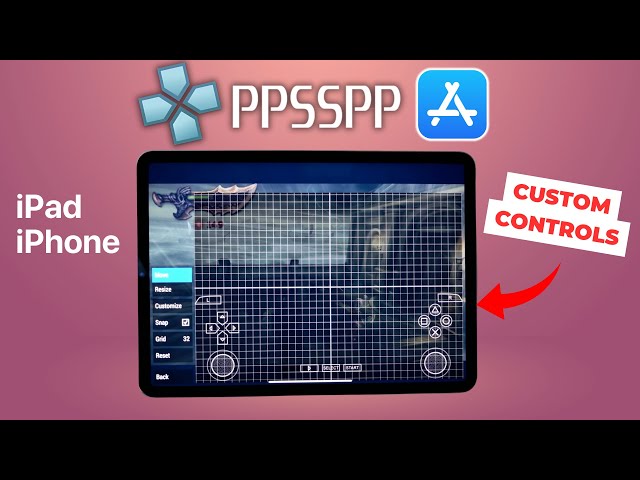
Drag, resize, and personalize on-screen controls to fit your playstyle perfectly.
Ready to relive PSP classics in HD? Grab it from the Play Store or the Mod link today. Drop questions about compatibility or best settings in the comments, happy gaming! 🎮
 About Naijaxnet
Naijaxnet.blogspot.com Is A Top Tech Blog That Provides Free And Cheap Browsing Cheats On Mtn, Etisalat, 9mobile, Glo And Airtel, Latest Phone And PC Updates, Android Reviews, Tips And Tricks, Tweaking Guides And Tech News.



No comments:
Post a Comment